CleanLoom
- 3.4
- Rating
- 5.00M
- Installs
- Free
- Price

 Analysis by App-foxy
My first impression of CleanLoom was that it aims to solve a very ordinary problem: the phone feels crowded, but deciding what to remove takes more effort than it should. Developed by BetterFly Games, this free tools app brings photos, videos, and other files into a cleaning workflow instead of leaving me to hunt through separate folders. That sounds simple, but the real question is whether it becomes part of a useful routine or gets opened once and forgotten.
After spending time with it, I see the strongest appeal in its low barrier to entry. It is free to use, carries an Everyone age rating, and runs on Android devices using version 7.0 or later. The current release is V1.0.4, so the experience feels like a focused utility rather than an overloaded phone-management suite. I would recommend trying it when storage clutter is becoming annoying, but I would not treat it as a substitute for careful file organization or a proper backup strategy.
From quick cleanup to a repeatable phone habit
I find it helpful to treat cleanup as a small, repeatable check rather than a rescue mission when storage is already tight. Choosing one natural trigger—after a trip, a project, or a busy week of sharing media—keeps the review manageable and gives me a clear stopping point. That habit also raises a practical question: what should an established user expect as the app continues to develop?
You May Also Like

 Blood Strike: 2.5 Anniversary
Blood Strike’s Loadouts Turn Every Drop Into a Tactical Gamble
A close look at Blood Strike’s custom loadouts: how fast access to signature weapons reshapes its battle royale rhythm, rewards preparation, and narrows the gap between fights.

 Pandora - Music & Podcasts
Pandora’s Music Is Easy to Start, but Harder to Recover
Pandora’s strength is its low-effort path from a seed to a station. Its weak spot is how much confidence it asks you to place in connection, setup, and quiet recovery.

 8 Ball Pool
 Is Built on Rivalries, Rematches, and Routine
A close look at the rivalries, rematches, shared routines, and unanswered safety questions that turn a quick pool match into a persistent mobile community.

 Samsung Music
’s Quiet Strength Is Playing What You Already Own
Its reach comes less from spectacle than from dependable access to a personal library. That simplicity is both the app’s strongest retention engine and its ceiling.

 AccuWeather: Weather Radar
AccuWeather Review: A Quick, Clear Forecast for Everyday Decisions
For everyday plans, the best forecast is the one you can understand quickly. AccuWeather makes rain timing, radar, and local conditions easy to act on, with a few trade-offs.

 Hill Climb Racing
Why Hill Climb Racing Still Turns Crashes Into One More Run
A tiny car, a bumpy hill and one more upgrade: Hill Climb Racing keeps resurfacing because its simple chaos makes every near-miss feel personal.
More From Our News Desk



Why the first week feels useful
The first session with a cleaner is often satisfying because it turns an invisible problem into something I can see. Old images, large videos, and forgotten files are much easier to deal with when they are presented as a task rather than scattered across the gallery and file manager. CleanLoom’s purpose is especially understandable for people who capture a lot of media and rarely return to sort it.
A realistic example is a weekend trip. I might come home with several nearly identical photos, short clips I never intend to watch again, and downloaded files that were useful for only a few hours. Instead of opening every folder individually, I can use a dedicated cleaning app as a review point. The important word is “review”: I still want to decide what matters before deleting anything.
That distinction is where the app earns trust. A useful cleaner should reduce the time spent searching without encouraging careless tapping. I found the best approach was to work in small groups, pause before removing anything personal, and treat suggested cleanup as a shortlist rather than an automatic command. This makes the process slower than blindly clearing everything, but much safer.
The app’s store summary focuses on cleaning junk and organizing photos, videos, and files, and that combination gives it a broader role than a gallery-only tool. Someone whose main problem is a messy camera roll may appreciate the media focus, while someone with a downloads folder full of documents can approach the same cleanup from the file side. I like that it addresses the clutter I actually notice in everyday use instead of presenting itself as a mysterious performance booster.
Who gets the most from it
CleanLoom is a good fit for people who take many screenshots, receive media through messaging apps, download temporary documents, or keep several versions of the same image. It can also help less technical users who know their phone is full but do not know where the space went. The fact that it has passed one million installs and holds a 4.0 average from around two thousand ratings suggests that the basic problem it addresses is familiar to a substantial audience.
I would be more cautious recommending it to someone who already has a disciplined folder system and regularly reviews storage through the phone’s built-in tools. In that case, another app may add an extra layer rather than save time. The same applies to users who need advanced file-management controls, detailed storage reports, or highly specific rules for sorting work material. CleanLoom is most convincing as a practical cleanup companion, not as a complete information-management system.
It is also worth setting expectations around the word “junk.” A file can be old, duplicated, or rarely opened without being useless. A scanned receipt, a family video, or an offline document may look disposable during a fast cleanup and become important later. My advice is to begin with obvious temporary material, then handle personal media separately. That two-pass method is one of the simplest ways to gain the convenience of a cleaner without surrendering control.
Small habits that make the app more valuable
The first non-obvious lesson is that a cleaning app works better as a checkpoint than as an emergency rescue tool. If I wait until storage is nearly exhausted, I am more likely to rush. Opening CleanLoom after a busy period of travel, events, or heavy messaging gives me a manageable batch and makes decisions easier. The value comes from reducing future clutter, not merely reacting to a full device.
A second useful workflow is to separate “easy yes,” “easy no,” and “decide later” items mentally before starting. Easy no items include files I recognize as temporary. Easy yes items are personal or work-related files I know I need. Everything uncertain should be left alone until I can check it properly. This sounds obvious, but it prevents the common mistake of judging a file only by its name or thumbnail.
A third insight is that organizing and deleting are different jobs. I would use CleanLoom to identify material that deserves attention, then move important files into a sensible album or folder before removing the leftovers. That approach is less dramatic than pressing one cleanup button, but it creates a phone that stays understandable. The app can support the habit; it cannot decide what a particular memory means to me.
What changes after the novelty fades
The first week provides the clearest visual reward because there is usually a backlog. After that, the amount of removable material becomes less impressive. This is normal, and it is where many utility apps lose their place on a phone. CleanLoom’s long-term value depends on whether its review process remains quicker than manually checking the gallery, downloads, and file folders.
For me, the app makes more sense as an occasional maintenance tool than something I would open every day. Daily cleaning would create unnecessary decision fatigue, especially for anyone who takes photos frequently. A weekly or monthly check is more realistic: clear obvious temporary files, review media from recent activities, and stop before the task becomes a long sorting session.
The month-to-month benefit is therefore not a permanently empty phone. It is a more predictable storage situation. If I use the app after a holiday, a large project, or a period of heavy media sharing, I can prevent several small piles of clutter from becoming one intimidating mess. That recurring value is modest but real, and it is more sustainable than chasing a perfect storage screen.
Where maintenance becomes work
Every cleanup tool creates a responsibility: I need to inspect its suggestions. The app may make discovery easier, but deletion is still a personal decision. If I have many similar photos, the tedious part is not finding them; it is choosing the one image worth keeping. CleanLoom can shorten the search, but it cannot remove the judgment involved in preserving memories, records, or useful references.
There is also a trade-off between convenience and caution. A broad scan is helpful when I have no idea where clutter is hiding, while a narrow review is safer when my phone contains important work files. I would start conservatively, deal with clearly disposable material, and only then consider more ambiguous categories. Anyone who expects a single action to understand their priorities will probably find the process frustrating.
Another maintenance issue is that organization requires follow-through. If I identify files I want to keep but leave them mixed together, the same confusion returns later. My practical routine would be to clean first, then spend a few minutes naming or grouping the files that survived. This is where the app’s usefulness depends on my behavior: it can make the first step easier, but the lasting order comes from what I do afterward.
Sources of fatigue over time
The biggest potential source of fatigue is repetition. Seeing similar images repeatedly can feel like another inbox to process, especially when the phone is used for work, family, travel, and entertainment at the same time. If every session asks me to make dozens of tiny decisions, the app stops feeling like a convenience and starts feeling like another chore.
A second source is uncertainty. Cleaning temporary downloads is straightforward; judging screenshots, edited photos, and files with vague names is not. I would avoid opening the app when I am distracted or in a hurry. A few minutes of rushed cleanup can create more trouble than the storage problem it was meant to solve.
The third issue is that storage space is not the only measure of a healthy phone. Removing files may make the device feel more organized, but it does not replace backups, sensible cloud storage choices, or a clear system for important documents. Users who want a complete device-care package may prefer the built-in storage manager or a more advanced file manager. Those alternatives can be better when detailed control matters more than a straightforward cleaning flow.
How it compares with familiar alternatives
The built-in Android storage tools remain the natural alternative. They are already part of the phone and usually make sense for users who want system-level visibility with no additional app. I would choose those tools when I need to understand broad storage categories or manage applications. I would lean toward CleanLoom when my immediate problem is the everyday mess of photos, videos, and files that I want to review in a more focused setting.
A gallery app is another strong alternative for photo-heavy users. Gallery tools are better when the main task is curating albums, selecting favorites, or preserving memories. CleanLoom has a clearer purpose when clutter crosses the boundary between media and general files. The trade-off is that a dedicated gallery may feel more natural for people who already keep their downloads and documents organized.
Traditional file managers offer the most direct control over names, folders, and locations. They are preferable for technical users, office documents, or anyone who needs to know exactly where an item is stored. The cost is that manual browsing takes more effort. CleanLoom’s appeal is the reduction of that effort, provided I remain willing to verify what I am about to remove.
Privacy, safety, and the right level of trust
Because a cleaning app deals with personal media and documents, I would never install one casually or grant trust based only on a polished interface. CleanLoom is published by BetterFly Games and has an Everyone content rating, but those details do not remove the need for sensible behavior. I would review what the app is asking to access, avoid deleting anything irreplaceable without a backup, and test the workflow on unimportant files first.
The safest routine is simple: preserve important originals elsewhere, inspect previews carefully, delete in small batches, and check the gallery and file folders afterward. This is especially important for family photos, identification documents, receipts, and work files. A cleaner should make housekeeping easier, not become the only place where I decide whether something still exists.
For a shared or family phone, I would also make sure the person who owns the files is involved. What looks like clutter to one user may be valuable to another. That is a practical limitation of every automated cleanup approach, and it is a reason I prefer guided review over aggressive removal.
Does it earn lasting space?
My long-term verdict is positive, with a clear condition: CleanLoom earns a place when I use it as a calm maintenance aid rather than a magic delete button. Its free price makes experimentation easy, and the focused purpose is approachable for users who feel overwhelmed by a crowded phone. The 4.0 average and broad install base indicate that it is not an obscure experiment, while its current V1.0.4 release keeps the product identity fairly direct.
I would keep it installed if my phone regularly fills with screenshots, short videos, downloads, and duplicate-looking media. The best recurring routine would be a short review after busy weeks, followed by a separate organization pass for anything worth keeping. That gives the app a job without allowing it to become another daily obligation.
I would skip it if I already manage storage comfortably through Android’s built-in tools, need professional-grade file controls, or dislike reviewing personal content inside a separate utility. In those cases, a gallery or file manager may be the better fit. CleanLoom is not valuable because it promises to transform the phone; it is valuable when it removes enough searching and friction to make ordinary cleanup actually happen.
In the end, I recommend trying CleanLoom for a specific clutter problem, not installing it with vague hopes of improving everything. Start with obvious temporary files, protect important material, and use the app at a sensible interval. If that routine saves me from repeatedly facing a chaotic camera roll and downloads folder, it has earned its space. Its lasting strength is habit support, not novelty.
FAQs for CleanLoom
01What is CleanLoom and how does it work?
CleanLoom is an app designed to optimize and clean your smartphone by removing unnecessary files, boosting performance, and managing storage effectively. It works by scanning your device for junk files, cache, and redundant data, offering you options to clear them with a single tap. This helps improve your device’s speed and free up storage space.
02Is CleanLoom safe to use on my device?
Yes, CleanLoom is designed with user safety in mind. It ensures that only unnecessary files are targeted, protecting important data and system files. The app does not require excessive permissions and adheres to privacy standards to protect user information. Always download the app from trusted sources like the Google Play Store or Apple App Store.
03Does CleanLoom drain battery or affect device performance?
CleanLoom is optimized to run efficiently without significantly impacting battery life or device performance. It uses minimal resources while operating and often helps enhance performance by clearing out background processes and junk files that may slow down your device. Regular use can lead to noticeable improvements in speed and responsiveness.
04Can CleanLoom help manage app storage and notifications?
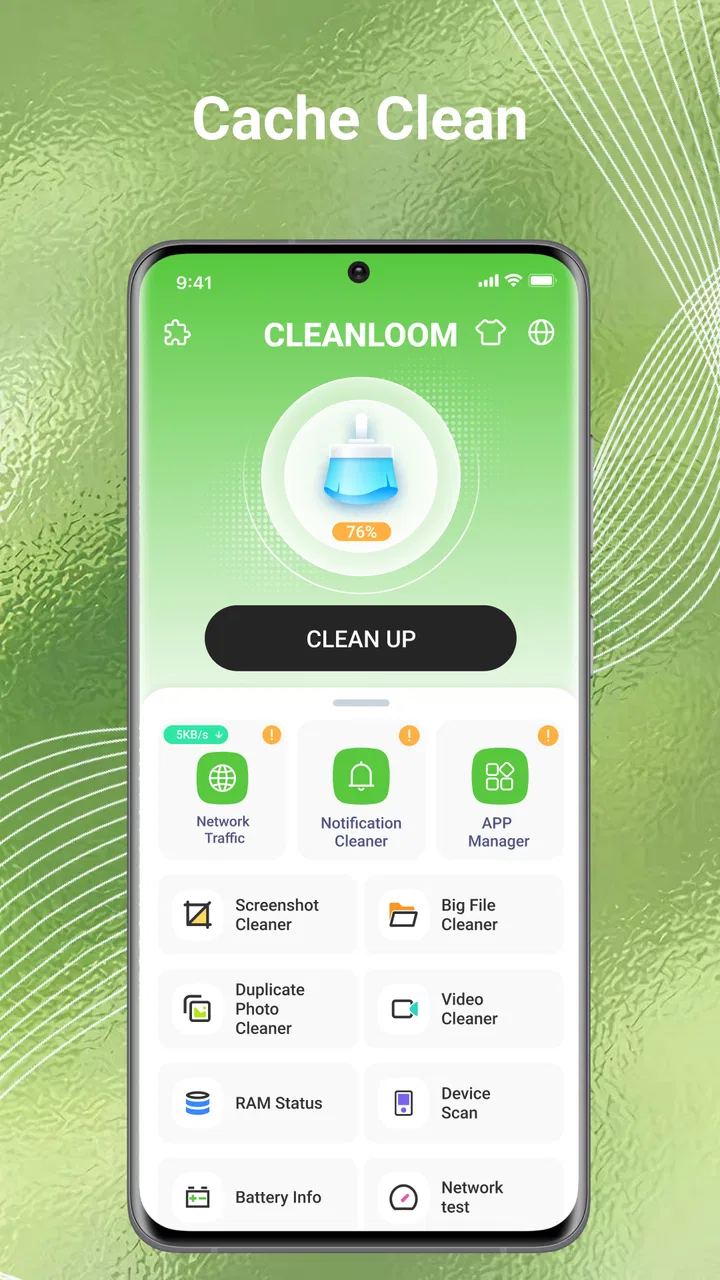
Yes, CleanLoom provides tools for managing app storage by identifying apps that take up significant space and offering options to clear cache or uninstall rarely used apps. It also includes features to manage and mute unwanted notifications, helping you maintain a clutter-free and efficient user experience on your device.
05Is CleanLoom available for both Android and iOS devices?
CleanLoom is available for both Android and iOS platforms, ensuring a wide range of compatibility with various devices. Users can download the app from the Google Play Store for Android devices and the Apple App Store for iOS devices, making it accessible to a broad audience seeking device optimization.
Pros
- User-friendly interface
- easy navigation.
- Efficiently boosts phone performance.
- Offers real-time battery optimization.
- Includes junk file cleaner feature.
- Minimal impact on device storage.
Cons
- Contains ads in free version.
- Limited features without premium.
- Occasional lag on older devices.
- No dark mode available.
- Requires frequent updates.

CleanLoom
Gallery